Showing posts with label Articles - Java. Show all posts

Monday, February 13, 2012

Practical Garbage Collection

Observing garbage collector behavior

I encourage readers to experiment with the behavior of the garbage collector. Use jconsole (comes with the JDK) or VisualVM (which produced the graph earlier on in this post) to visualize behavior on a running JVM. But, in particular, start getting familiar with garbage collection log output, by running your JVM with (updated with jbellis’ feedback – thanks!):

  • -XX:+PrintGC
  • -XX:+PrintGCDetails
  • -XX:+PrintGCDateStamps
  • -XX:+PrintGCApplicationStoppedTime
  • -XX:+PrintPromotionFailure
Also useful but verbose (meaning explained in later posts):
  • -XX:+PrintHeapAtGC
  • -XX:+PrintTenuringDistribution
  • -XX:PrintFLSStatistics=1
The output is pretty easy to read for the throughput collector. For CMS and G1, the output is more opaque to analysis without an introduction. I hope to cover this in a later update.

In the mean time, the take-away is that those options above are probably the first things you want to use whenever you suspect that you have a GC related problem. It is almost always the first thing I tell people when they start to hypothesize GC issues; have you looked at GC logs? If you have not, you are probably wasting your time speculating about GC.

Sunday, February 12, 2012

Practical Garbage Collection

Available Hotspot garbage collectors

The default choice of garbage collector in Hotspot is the throughput collector, which is a generational, parallel, compacting collector. It is entirely optimized for throughput; total amount of work achieved by the application in a given time period.

The traditional alternative for situations where latency/pause times are a concern, is the CMS collector. CMS stands for Concurrent Mark & Sweep and refers to the mechanism used by the collector. The purpose of the collector is to minimize or even eliminate long stop-the-world pauses, limiting garbage collection work to shorter stop-the-world (often parallel) pauses, in combination with longer work performed concurrently with the application. An important property of the CMS collector is that it is not compacting, and thus suffers from fragmentation concerns (more on this in a later blog post).

As of later versions of JDK 1.6 and JDK 1.7, there is a new garbage collector available which is called G1 (which stands for Garbage First). It’s aim, like the CMS collector, is to try to mitigate or eliminate the need for long stop-the-world pauses and it does most of it’s work in parallel in short stop-the-world incremental pauses, with some work also being done concurrently with the application. Contrary to CMS, G1 is a compacting collector and does not suffer from fragmentation concerns – but has other trade-offs instead (again, more on this in a later blog post).

Saturday, February 11, 2012

Practical Garbage Collection

Concurrent collection

Concurrent in a garbage collection context refers to performing garbage collection work concurrently with the application (mutator). For example, on an 8 core system, a garbage collector might keep two background threads that do garbage collection work while the application is running. This allows significant amounts of work to be done without incurring an application pause, usually at some cost of throughput and implementation complexity (for the garbage collector implementor).

Friday, February 10, 2012

Practical Garbage Collection

Incremental collection

Incremental in a garbage collection context refers to dividing up the work that needs to be done in smaller chunks, often with the aim of pausing the applications for multiple brief periods instead of a single long pause. The behavior of the generational collector described above is partially incremental in the sense that the young generation collectors constitute incremental work. However, as a whole, the collection process is not incremental because of the full heap collections incurred when the old generation becomes full.
Other forms of incremental collections are possible; for example, a collector can do a tiny bit of garbage collection work for every allocation performed by the application. The concept is not tied to a particular implementation strategy.

Thursday, February 9, 2012

Practical Garbage Collection

Parallel collection

The point of having a generational collector is to optimize for throughput; in other words, the total amount of work the application gets to do in a particular amount of time. As a side-effect, most of the pauses incurred due to garbage collection also become shorter. However, no attempt is made to eliminate the periodic full collections which will imply a pause time of whatever is necessary to complete a full collection.

The throughput collector does do one thing which is worth mentioning in order to mitigate this: It is parallel, meaning it uses multiple CPU cores simultaneously to speed up garbage collection. This does lead to shorter pause times, but there is a limit to how far you can go – even in an unrealistic perfect situation of a linear speed-up (meaning, double CPU count -> half collection time) you are limited by the number of CPU cores on your system. If you are collecting a 30 GB heap, that is going to take some significant time even if you do so with 16 parallel threads.

In garbage collection parlance, the word parallel is used to refer to a collector that does work on multiple CPU cores at the same time.

Wednesday, February 8, 2012

Practical Garbage Collection

Generational garbage collection

Most real-world applications tend to perform a lot allocation of short-lived objects (in other words, objects that are allocated, used for a brief period, and then no longer referenced). A generational garbage collector attempts to exploit this observation in order to be more CPU efficient (in other words, have higher throughput). (More formally, the hypothesis that most applications have this behavior is known as the weak generational hypothesis.)

It is called “generational” because objects are divided up into generations. The details will vary between collectors, but a reasonable approximation at this point is to say that objects are divided into two generations:

  • The young generation is where objects are initially allocated. In other words, all objects start off being in the young generation.
  • The old generation is where objects “graduate” to when they have spent some time in the young generation.

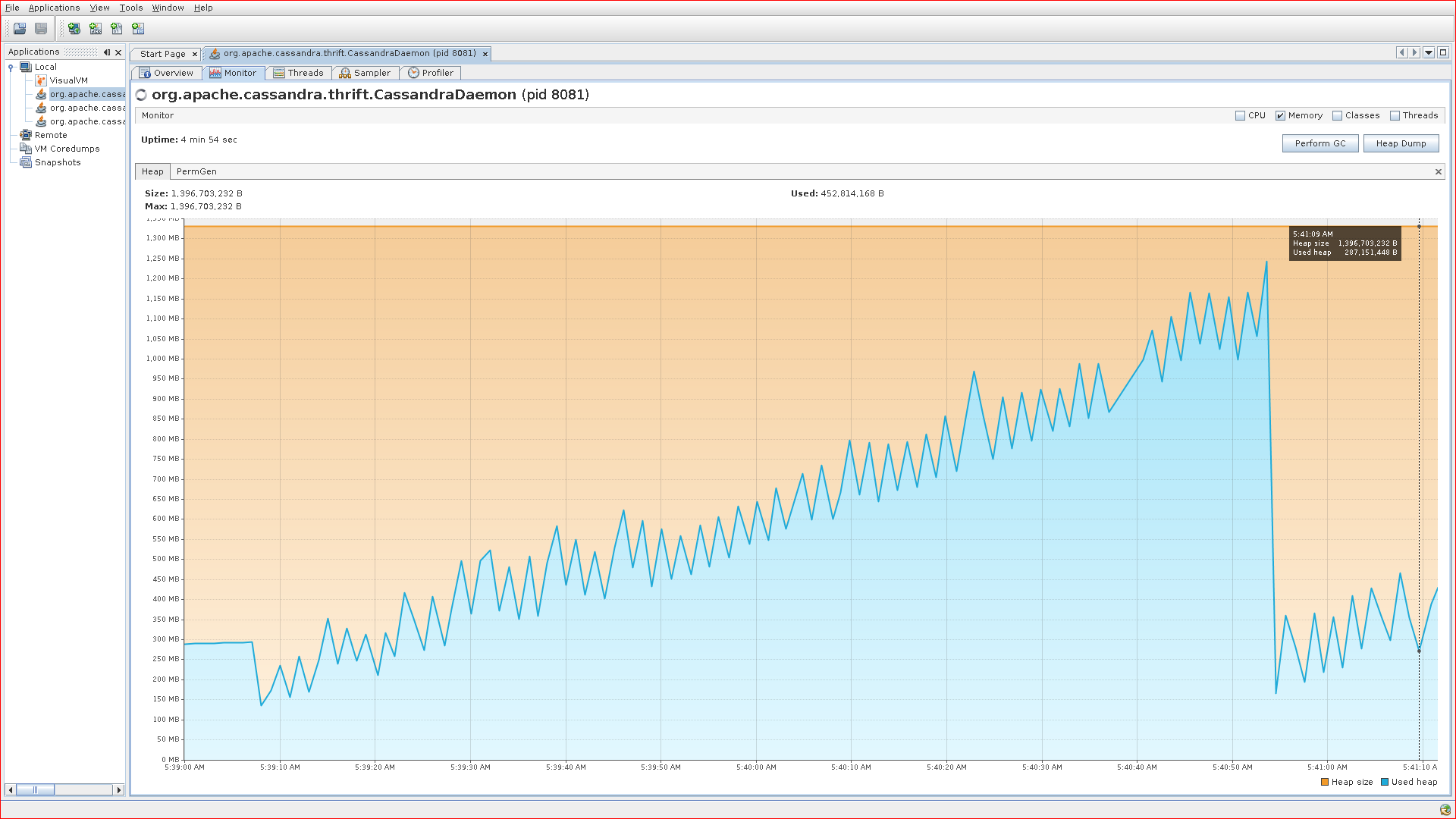
The reason why generational collectors are typically more efficient, is that they collect the young generation separately from the old generation. Typical behavior of an application in steady state doing allocation, is frequent short pauses as the young generation is being collected – punctuated by infrequent but longer pauses as the old generation fills up and triggers a full collection of the entire heap (old and new). If you look at a heap usage graph of a typical application, it will look similar to this:

Typical sawtooth behavior of heap usage
Typical sawtooth behavior of heap usage with the throughput collector
The ongoing sawtooth look is a result of young generation garbage collections. The large dip towards the end is when the old generation became full and the JVM did a complete collection of the entire heap. The amount of heap usage at the end of that dip is a reasonable approximation of the actual live set at that point in time. (Note: This is a graph from running a stress test against a Cassandra instance configured to use the default JVM throughput collector; it does not reflect out-of-the-box behavior of Cassandra.)

Note that simply picking the “current heap usage” at an arbitrary point in time on that graph will not give you an idea of the memory usage of the application. I cannot stress that point enough. What is typically considered the memory “usage” is the live set, not the heap usage at any particular time. The heap usage is much more a function of the implementation details of the garbage collector; the only effect on heap usage from the memory usage of the application is that it provides a lower bound on the heap usage.
Now, back to why generational collectors are typically more efficient.

Suppose our hypothetical application is such that 90% of all objects die young; in other words, they never survive long enough to be promoted to the old generation. Further, suppose that our collection of the young generation is compacting (see previous sections) in nature. The cost of collecting the young generation is now roughly that of tracing and copying 10% of the objects it contains. The cost associated with the remaining 90% was quite small. Collection of the young generation happens when it becomes full, and is a stop-the-world pause.

The 10% of objects that survived may be promoted to the old generation immediately, or they may survive for another round or two in young generation (depending on various factors). The important overall behavior to understand however, is that objects start off in the young generation, and are promoted to the old generation as a result of surviving in the young generation.

(Astute readers may have noticed that collecting the young generation completely separately is not possible – what if an object in the old generation has a reference to an object in the new generation? This is indeed something a garbage collector must deal with; a future post will talk about this.)

The optimization is quite dependent on the size of the young generation. If the size is too large, it may be so large that the pause times associated with collecting it is a noticeable problem. If the size is too small, it may be that even objects that die young do not die quite quickly enough to still be in the young generation when they die.

Recall that the young generation is collected when it becomes full; this means that the smaller it is, the more often it will be collected. Further recall that when objects survive the young generation, they get promoted to the old generation. If most objects, despite dying young, never have a chance to die in the young generation because it is too small – they will get promoted to the old generation and the optimization that the generational garbage collector is trying to make will fail, and you will take the full cost of collecting the object later on in the old generation (plus the up-front cost of having copied it from the young generation).

Tuesday, February 7, 2012

Practical Garbage Collection

Compacting vs. non-compacting garbage collection

An important distinction between garbage collectors is whether or not they are compacting. Compacting refers to moving objects around (in memory) to as to collect them in one dense region of memory, instead of being spread out sparsely over a larger region.

Real-world analogy: Consider a room full of things on the floor in random places. Taking all these things and stuffing them tightly in a corner is essentially compacting them; freeing up floor space. Another way to remember what compaction is, is to envision one of those machines that take something like a car and compact it together into a block of metal, thus taking less space than the original car by eliminating all the space occupied by air (but as someone has pointed out, while the car id destroyed, objects on the heap are not!).

By contrast a non-compacting collector never moves objects around. Once an object has been allocated in a particular location in memory, it remains there forever or until it is freed.
There are some interesting properties of both:

  • The cost of performing a compacting collection is a function of the amount of live data on the heap. If only 1% of data is live, only 1% of data needs to be compacted (copied in memory).
  • By contrast, in a non-compacting collector objects that are no longer reachable still imply book keeping overhead as their memory locations must be kept track of as being freed, to be used in future allocations.
  • In a compacting collector, allocation is usually done via a bump-the-pointer approach. You have some region of space, and maintain your current allocation pointer. If you allocate an object of n bytes, you simply bump that pointer by n (I am eliding complications like multi-threading and optimizations that implies).
  • In a non-compacting collector, allocation involves finding where to allocate using some mechanism that is dependent on the exact mechanism used to track the availability of free memory. In order to satisfy an allocation of n bytes, a contiguous region of n bytes free space must be found. If one cannot be found (because the heap is fragmented, meaning it consists of a mixed bag of free and allocated space), the allocation will fail.

Real-world analogy: Consider your room again. Suppose you are a compacting collector. You can move things around on the floor freely at your leisure. When you need to make room for that big sofa in the middle of the floor, you move other things around to free up an appropriately sized chunk of space for the sofa. On the other hand, if you are a non-compacting collector, everything on the floor is nailed to it, and cannot be moved. A large sofa might not fit, despite the fact that you have plenty of floor space available – there is just no single space large enough to fit the sofa.

Monday, February 6, 2012

Practical Garbage Collection

Basic stop-the-world, mark, sweep, resume

A very simple tracing garbage collector works using the following process:

  1. Pause the application completely.
  2. Mark all objects that are reachable (from the root set, see above) by tracing the object graph (i.e., following references recursively).
  3. Free all objects that were not reachable.
  4. Resume the application.
In a single-threaded world, this is pretty easy to imagine: The call that is responsible for allocating a new object will either return the new object immediately, or, if the heap is full, initiate the above process to free up space, followed by completing the allocation and returning the object.
None of the JVM garbage collectors work like this. However, it is good to understand this basic form of a garbage collector, as the available garbage collectors are essentially optimizations of the above process.
The two main reasons why the JVM does not implement garbage collection like this are:
  • Every single garbage collection pause will be long enough to collect the entire heap; in other words, it has very poor latency.
  • For almost all real-world applications, it is by far not the most efficient way to perform garbage

Sunday, February 5, 2012

Practical Garbage Collection

Tracing vs. reference counting

You may have heard of reference counting being used (for example, cPython uses a reference counting scheme for most of it’s garbage collection work). I am not going to talk much about it because it is not relevant to JVM:s, except to say two things:

  • One property that reference counting garbage collection has is that an object will be known to be unreachable immediately at the point where the last reference is removed.
  • Reference counting will not detect as unreachable cyclic data structures, and has some other problems that cause it to not be the end-all be-all garbage collection choice.

The JVM instead uses what is known as a tracing garbage collector. It is called tracing because, at least at an abstract level, the process of identifying garbage involves taking the root set (things like your local variables on your stack or global variables) and tracing a path from those objects to all objects that are directly or indirectly reachable from said root set. Once all reachable (live) objects have been identified, the objects eligible for being freed by the garbage collector have been identified by a proces of elimination.

Saturday, February 4, 2012

Practical Garbage Collection

Why should anyone have to care about the garbage collector?

That is a good question. The perfect garbage collector would do its job without a human ever noticing that it exists. Unfortunately, there exists no known perfect (whatever perfection means) garbage collection algorithm. Further, the selection of garbage collectors practically available to most people is additionally limited to a subset of garbage collection algorithms that are in fact implemented. (Similarly, malloc is not perfect either and has its issues, with multiple implementations available with different characteristics. However, this post is not trying to contrast automatic and explicit memory management, although that is an interesting topic.)

The reality is that, as with many technical problems, there are some trade-offs involved. As a rule of thumb, if you’re using the freely available Hotspot based JVM:s (Oracle/Sun, OpenJDK), you mostly notice the garbage collector if you care about latency. If you do not, chances are the garbage collector will not be a bother – other than possibly to select a maximum heap size different from the default.

By latency, in the context of garbage collection, I mean pause times. The garbage collector needs to pause the application sometimes in order to do some of its work; this is often referred to as a stop-the-world pause (the “world” being the observable universe from the perspective of the Java application, or mutator in GC speak (because it is mutating the heap while the garbage collector is trying to collect it). It is important to note that while all practically available garbage collectors impose stop-the-world pauses on the application, the frequency and duration of these pauses vary greatly with the choice of garbage collector, garbage collector settings, and application behavior.

As we shall see, there exists garbage collection algorithms that attempt to avoid the need to ever collect the entire heap in a stop-the-world pause. The reason this is an important property is that if at any point (even if infrequent), you stop the application for a complete collection of the heap, the pause times suffered by the application scale proportionally to the heap size. This is typically the main thing you want to avoid when you care about latency. There are other concerns as well, but this is usually the big one.

Friday, February 3, 2012

Practical Garbage Collection

This is the first part of a series of blog posts I intend to write, whose aim will be to explain how garbage collection works in the real world (in particular, with the JVM). I will cover some theory that I believe is necessary to understand garbage collection enough for practical purposes, but will keep it to a minimum.

The motivation is that garbage collection related questions keeps coming up in variety of circumstances, including (for example) on the Cassandra mailing list. The problem when trying to help is that explaining the nuances of garbage collection is too much of an effort to do ad-hoc in a mailing list reply tailored to that specific situation, and you rarely have enough information about the situation to tell someone what their particular problem is caused by.

I hope that this guide will be something I can point to in answering these questions. I hope that it will be detailed enough to be useful, yet easy to digest and non-academic enough for a broad audience.  I very much appreciate any feedback on what I need to clarify, improve, rip out completely, etc.Much of the information here is not specific to Java. However, in order to avoid constantly invoking generic and abstract terminology, I am going to speak in concrete terms of the Hotspot JVM wherever possible.

Monday, January 9, 2012

Downcasting in Java

Downcasting

  • An upcast reference can be downcast to a subclass through explicit casting. For example:
    Employee e = new Manager(...);
    // ...
    Manager m = (Manager) e;
    • The object referenced must actually be a member of the downcast type, or else a ClassCastException run-time exception occurs.
  • You can test if an object is a member of a specific type using the instanceof operator, for example:
    if (obj instanceof Manager) { // We've got a Manager object }
public class EmployeeDemo {
    public static void main(String[] args) {
        final Employee e1 = new Employee("John", "555-12-345", "john@company.com");
        final Employee e2 = new Employee("456-78-901", 1974);
        e2.setName("Tom");
        Employee em = new Manager("Bob", "345-11-987", "Development");

        Employee.setBaseVacationDays(15);
        e2.setExtraVacationDays(5);
        em.setExtraVacationDays(10);

        if (em instanceof Manager) {
            Manager m = (Manager) em;
            m.setResponsibility("Operations");
        }

        e1.print("COOL EMPLOYEE");
        e2.print("START OF EMPLOYEE", "END OF EMPLOYEE");
        em.print("BIG BOSS");
    }
}
This would print:
BIG BOSS
Name: Bob
SSN: 345-11-987
Email Address: null
Year Of Birth: 0
Vacation Days: 25
Responsibility: Operations

Sunday, January 8, 2012

Upcasting in java

Upcasting

  • Once you have upcast an object reference, you can access only the fields and methods declared by the base class.
    • For example, if Manager is a subclass of Employee:
      Employee e = new Manager(...);
    • Now using e you can access only the fields and methods declared by the Employee class.
  • However, if you invoke a method on e that is defined in Employee but overridden in Manager, the Manager version is executed.
    • For example:
      public class A {
          public void print() {
              System.out.println("Hello from class A");
          }
      }
      public class B extends A {
          public void print() {
              System.out.println("Hello from class B");
          }
      }
      // ...
      A obj = new B();
      obj.print();
      In the case, the output is "Hello from class B".
From within a subclass, you can explicitly invoke a base class’s version of a method by using the super. prefix on the method call.

Saturday, January 7, 2012

Overriding vs. Overloading

Overriding vs. Overloading

  • The subclass can override its parent class definition of fields and methods, replacing them with its own definitions and implementations.
    • To successfully override the base class method definition, the subclass method must have the same signature.
    • If the subclass defines a method with the same name as one in the base class but a different signature, the method is overloaded not overridden.
  • A subclass can explicitly invoked an ancestor class’s implementation of a method by prefixing super. to the method call. For example:
    class Subclass extends ParentClass {
        public String getDescription() {
            String parentDesc = super.getDescription();
            return "My description\n" + parentDesc;
        }
    }
Consider defining a Manager class as a subclass of Employee:
public class Manager extends Employee {
    private String responsibility;

    public Manager(String name, String ssn, String responsibility) {
        super(name, ssn);
        this.responsibility = responsibility;
    }

    public void setResponsibility(String responsibility) {
        this.responsibility = responsibility;
    }

    public String getResponsibility() {
        return this.responsibility;
    }

    public void print(String header, String footer) {
        super.print(header, null);
        System.out.println("Responsibility: " + responsibility);
        if (footer != null) {
            System.out.println(footer);
        }
    }
}
Now with code like this:
public class EmployeeDemo {
    public static void main(String[] args) {
        …
        Manager m1 = new Manager("Bob", "345-11-987", "Development");
        Employee.setBaseVacationDays(15);
        m1.setExtraVacationDays(10);
        …
        m1.print("BIG BOSS");
    }
}
The output is:
BIG BOSS
Name: Bob
SSN: 345-11-987
Email Address: null
Year Of Birth: 0
Vacation Days: 25
Responsibility: Development
Note that the Manager class must invoke one of super’s constructors in order to be a valid Employee. Also observe that we can invoke a method like setExtraVacationDays() that is defined in Employee on our Manager instance m1.

Friday, January 6, 2012

Inheritance, Composition, and Aggregation

Inheritance, Composition, and Aggregation

  • Complex class structures can be built through inheritance, composition, and aggregation.
  • Inheritance establishes an “is-a” relationship between classes.
    • The subclass has the same features and functionality as its base class, with some extensions.
    • A Car is-a Vehicle. An Apple is-a Food.
  • Composition and aggregation are the construction of complex classes that incorporate other objects.
    • They establish a “has-a” relationship between classes.
    • A Car has-a Engine. A Customer has-a CreditCard.
  • In composition, the component object exists solely for the use of its composite object.
    • If the composite object is destroyed, the component object is destroyed as well.
    • For example, an Employee has-a name, implemented as a String object. There is no need to retain the String object once the Employee object has been destroyed.
  • In aggregation, the component object can (but isn’t required to) have an existence independent of its use in the aggregate object.
    • Depending on the structure of the aggregate, destroying the aggregate may or may not destroy the component.
    • For example, let’s say a Customer has-a BankAccount object. However, the BankAccount might represent a joint account owned by multiple Customers. In that case, it might not be appropriate to delete the BankAccount object just because one Customer object is deleted from the system.
Notice that composition and aggregation represent another aspect of encapsulation. For example, consider a Customer class that includes a customer’s birthdate as a property. We could define a Customer class in such a way that it duplicates all of the fields and methods from and existing class like Date, but duplicating code is almost always a bad idea. What if the data or methods associated with a Date were to change in the future? We would also have to change the definitions for our Customer class. Whenever a set of data or methods are used in more than one place, we should look for opportunities to encapsulate the data or methods so that we can reuse the code and isolate any changes we might need to make in the future.
Additionally when designing a class structure with composition or aggregation, we should keep in mind the principle of encapsulation when deciding where to implement functionality. Consider implementing a method on Customer that would return the customer’s age. Obviously, this depends on the birth date of the customer stored in the Date object. But should we have code in Customer that calculates the elapsed time since the birth date? It would require the Customer class to know some very Date-specific manipulation. In this case, the code would be tightly coupled –- a change to Date is more likely to require a change to Customer as well. It seems more appropriate for Date objects to know how to calculate the elapsed time between two instances. The Customer object could then delegate the age request to the Date object in an appropriate manner. This makes the classes loosely coupled –- so that a change to Date is unlikely to require a change to Customer.

Thursday, January 5, 2012

Static vs. Instance Methods

Static vs. Instance Methods

  • Static methods can access only static data and invoke other static methods.
    • Often serve as helper procedures/functions
    • Use when the desire is to provide a utility or access to class data only
  • Instance methods can access both instance and static data and methods.
    • Implement behavior for individual objects
    • Use when access to instance data/methods is required
  • An example of static method use is Java’s Math class.
    • All of its functionality is provided as static methods implementing mathematical functions (e.g., Math.sin()).
    • The Math class is designed so that you don’t (and can’t) create actual Math instances.
  • Static methods also are used to implement factory methods for creating objects, a technique discussed later in this class.
class Employee {
    String name;
    String ssn;
    String emailAddress;
    int yearOfBirth;
    int extraVacationDays = 0;
    static int baseVacationDays = 10;

    Employee(String name, String ssn) {
        this.name = name;
        this.ssn = ssn;
    }

    static void setBaseVacationDays(int days) {
        baseVacationDays = days < 10? 10 : days;
    }

    static int getBaseVacationDays() {
        return baseVacationDays;
    }

    void setExtraVacationDays(int days) {
        extraVacationDays = days < 0? 0 : days;
    }

    int getExtraVacationDays() {
        return extraVacationDays;
    }

    void setYearOfBirth(int year) {
        yearOfBirth = year;
    }

    int getVacationDays() {
        return baseVacationDays + extraVacationDays;
    }

    void print() {
        System.out.println("Name: " + name);
        System.out.println("SSN: " + ssn);
        System.out.println("Email Address: " + emailAddress);
        System.out.println("Year Of Birth: " + yearOfBirth);
        System.out.println("Vacation Days: " + getVacationDays());
    }
}
To change the company vacation policy, do Employee.setBaseVacationDays(15);
To give one employee extra vacation, do e2.setExtraVacationDays(5);

Wednesday, January 4, 2012

Static vs. Instance Data Fields

Static vs. Instance Data Fields

  • Static (or class) data fields
    • Unique to the entire class
    • Shared by all instances (objects) of that class
    • Accessible using ClassName.fieldName
    • The class name is optional within static and instance methods of the class, unless a local variable of the same name exists in that scope
    • Subject to the declared access mode, accessible from outside the class using the same syntax
  • Instance (object) data fields
    • Unique to each instance (object) of that class (that is, each object has its own set of instance fields)
    • Accessible within instance methods and constructors using this.fieldName
    • The this. qualifier is optional, unless a local variable of the same name exists in that scope
    • Subject to the declared access mode, accessible from outside the class from an object reference using objectRef.fieldName
Say we add the following to our Employee class:
static int vacationDays = 10;
and we print this in the Employee’s print() method:
System.out.println("Vacation Days: " + vacationDays);
In the EmployeeDemo’s main() method, we change vacationDays to 15:
Employee.vacationDays = 15;
Now, e1.print() and e2.print() will both show the vacation days set to 15. This is because both e1 and e2 (and any other Employee object) share the static vacationDays integer field.
The field vacationDays is part of the Employee class, and this is also stored on the heap, where it is shared by all objects of that class.
Static fields that are not protected (which we will soon learn how to do) are almost like global variables — accessible to anyone.
Note that it is possible to access static fields through instance variables (e.g., e1.vacationDays = 15; will have the same effect), however this is discouraged. You should always access static fields by ClassName.staticFieldName, unless you are within the same class, in which case you can just say staticFieldName.

Tuesday, January 3, 2012

Garbage Collection

Garbage Collection

  • Unlike some OO languages, Java does not support an explicit destructor method to delete an object from memory.
    • Instead, unused objects are deleted by a process known as garbage collection.
  • The JVM automatically runs garbage collection periodically. Garbage collection:
    • Identifies objects no longer in use (no references)
    • Finalizes those objects (deconstructs them)
    • Frees up memory used by destroyed objects
    • Defragments memory
  • Garbage collection introduces overhead, and can have a major affect on Java application performance.
    • The goal is to avoid how often and how long GC runs.
    • Programmatically, try to avoid unnecessary object creation and deletion.
    • Most JVMs have tuning parameters that affect GC performance.
Benefits of garbage collection:
  • Frees up programmers from having to manage memory. Manually identifying unused objects (as in a language such as C++) is not a trivial task, especially when programs get so complex that the responsibility of object destruction and memory deallocation becomes vague.
  • Ensures integrity of programs:
    • Prevents memory leaks — each object is tracked down and disposed off as soon as it is no longer used.
    • Prevents deallocation of objects that are still in use or have already been released. In Java it is impossible to explicitly deallocate an object or use one that has already been deallocated. In a language such as C++ dereferencing null pointers or double-freeing objects typically crashes the program.
Through Java command-line switches (java -X), you can:
  • Set minimum amount of memory (e.g. -Xmn)
  • Set maximum amount of memory (e.g. -Xmx, -Xss)
  • Tune GC and memory integrity (e.g. -XX:+UseParallelGC)
For more information, see: http://java.sun.com/docs/hotspot/VMOptions.html and http://www.petefreitag.com/articles/gctuning/

Monday, January 2, 2012

Accessing Objects through References

Accessing Objects through References

Employee e1 = new Employee();
Employee e2 = new Employee();

// e1 and e2 refer to two independent Employee objects on the heap

Employee e3 = e1;

// e1 and e3 refer to the *same* Employee object

e3 = e2;

// Now e2 and e3 refer to the same Employee object

e1 = null;

// e1 no longer refers to any object. Additionally, there are no references
// left to the Employee object previously referred to by e1. That "orphaned"
// object is now eligible for garbage collection.
[Note]Note
The statement Employee e3 = e2; sets e3 to point to the same physical object as e2. It does not duplicate the object. Changes to e3 are reflected in e2 and vice-versa.

Sunday, January 1, 2012

Java Memory Model

Java Memory Model

  • Java variables do not contain the actual objects, they contain references to the objects.
    • The actual objects are stored in an area of memory known as the heap.
    • Local variables referencing those objects are stored on the stack.
    • More than one variable can hold a reference to the same object.
Figure 1. Java Memory Model
Java Memory Model


As previously mentioned, the stack is the area of memory where local variables (including method parameters) are stored. When it comes to object variables, these are merely references (pointers) to the actual objects on the heap.
Every time an object is instantiated, a chunk of heap memory is set aside to hold the data (state) of that object. Since objects can contain other objects, some of this data can in fact hold references to those nested objects.
In Java:
  • Object references can either point to an actual object of a compatible type, or be set to null (0 is not the same as null).
  • It is not possible to instantiate objects on the stack. Only local variables (primitives and object references) can live on the stack, and everything else is stored on the heap, including classes and static data.